

| Screen Lock |  | |
| | ||
Simi Studio | ||
Locker | ||
| VERSION/BUILD: 3.31 | ||
| UPDATED: 28 January 2018 | ||
| REQUIRES ANDROID: 4.1 and up | ||
| FILE SIZE: 4.38 M |
Just one touch to lock and turn off screen.
The hardware power button of some devices is not well designed. The frequent use to power on/off screen may damage it. We provide the software shortcuts to replace it and extend its lifespan.
★ Different kinds of buttons:
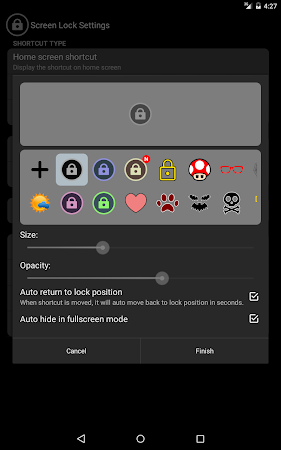
- Display on home screen
- Display in the notification
- Float over other apps (floating button)
★ Features:
- Adjust the size of the floating button
- Adjust the opacity of the floating button
- Built-in icon library
- Select icon from the pictures in your device
- Vibrate when locking
- Play sounds when locking
- (Floating button) Display weather information
- (Floating button) Auto hide in the fullscreen mode
- (Floating button) Set to the desired position on the screen
- (Floating button) Auto return to the set position
(In this mode, when button is moved, it will automatically move back to the set position in seconds. To change the set position, just move it to new position & hold in seconds)
- (Floating button) Long-press floating button to reveal more shortcuts
(memory boost/app shortcuts/system settings/screen capture/flashlight/...)
★ Notice:
- This application may use accessibility service to let lock button floating over other apps.
- If you need to uninstall our application, please must uninstall it from "Screen Lock Settings".
- This app requires device administrator policy to lock screen
Google Play Rating
4.6
12,335 total
59,212
41,927
3521
2160
1515
App Screenshots
What's New
- [v3.32] 2018.02.04
- (floating button) Fix persistent mode doesn't work
- Fix can't browse the screenshot after capturing screen
- Bug fixes
[v3.31] 2018.01.29
- Add more icons
- Bug fixes
[v3.30] 2018.01.14]
- Support Korean (한국어)
- Support German (Deutsch)
- Support Indonesian (Bahasa indonesia)
- Support Thai (ไทย)
- Bug fixes
Download & Instructions

EmoticonEmoticon